 sales@sunriver-electric.com
The Customer Panic Story
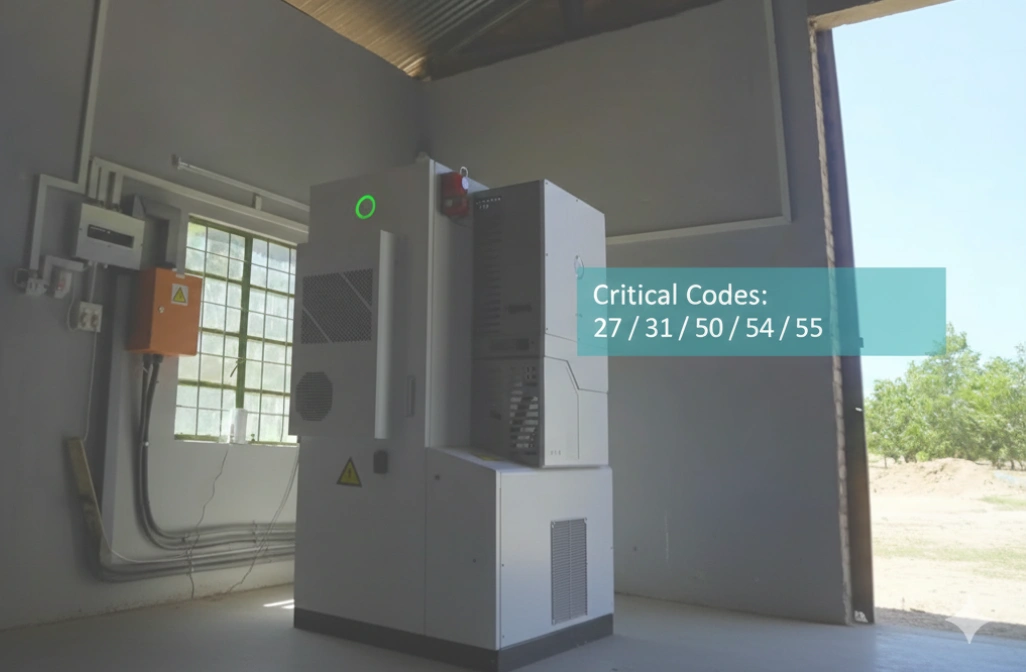
Last week, a customer called me in a panic about error code 27 flashing on his SAJ CHS2 system.
"I don’t know what this means," he said, "and I’m worried something terrible is happening."
I told him: "Before we do anything else, let’s first understand what this code is actually telling us. Then we’ll know exactly how to respond safely."
The Resolution: It turned out error code 27 indicated a ground fault1 – a serious safety issue requiring immediate system shutdown and professional contact. His instinct to be concerned was absolutely right.
Our Promise to You
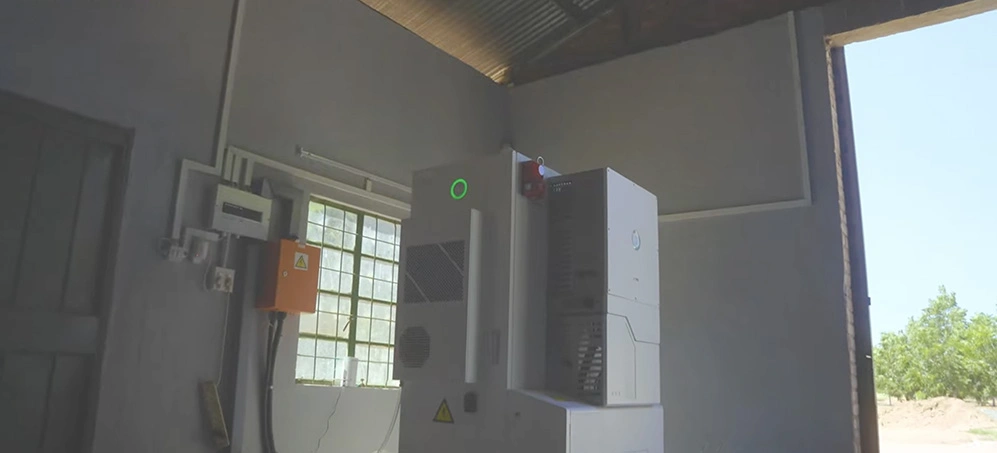
At Sunriver Electric, as SAJ’s trusted partner, we’ve helped hundreds of system owners understand their CHS2 all-in-one energy storage system error codes.
We’ve compiled this systematic approach to help you:
- Quickly identify what your system is telling you
- Assess whether it’s safe
- Take the right action immediately
Three Essential Principles
Understanding SAJ CHS2 error codes requires three essential principles:
- Immediate safety assessment
- Systematic diagnosis
- Proper escalation
This guide walks you through each step, so you’ll never feel helpless when your system displays an error.
What SAJ CHS2 Error Codes Mean (and why it’s often protection)
Your System is Speaking to You
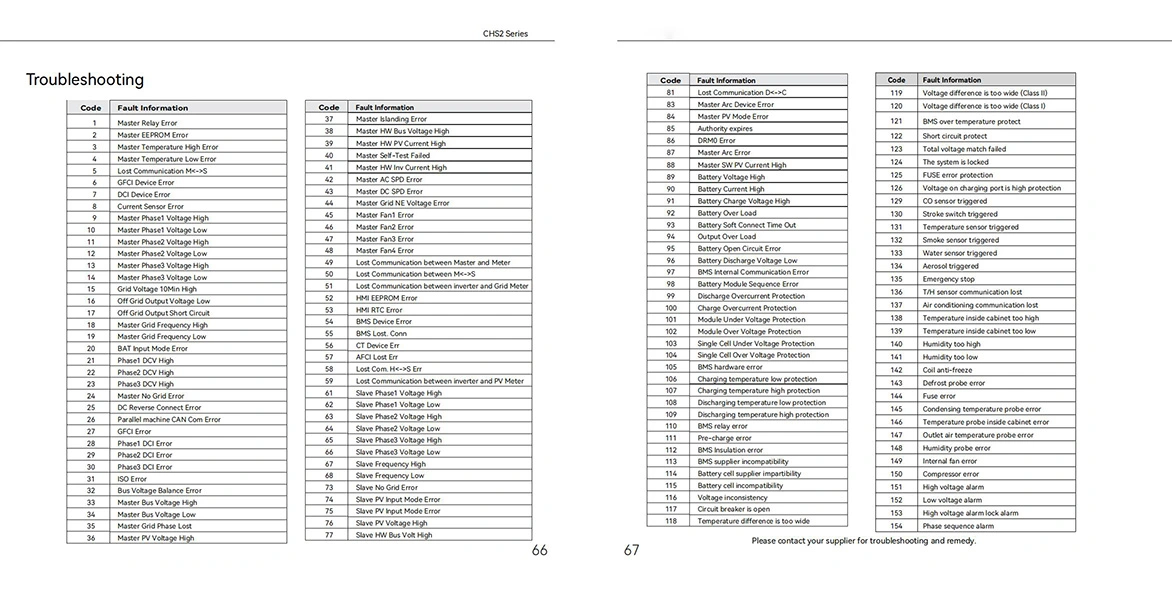
When your SAJ CHS2 system displays an error code, it’s like your system speaking to you in a technical language.
Most of the time, it’s not saying "I’m broken."
It’s actually saying: "I’m protecting myself and your home from potentially dangerous conditions."
Error Severity Distribution
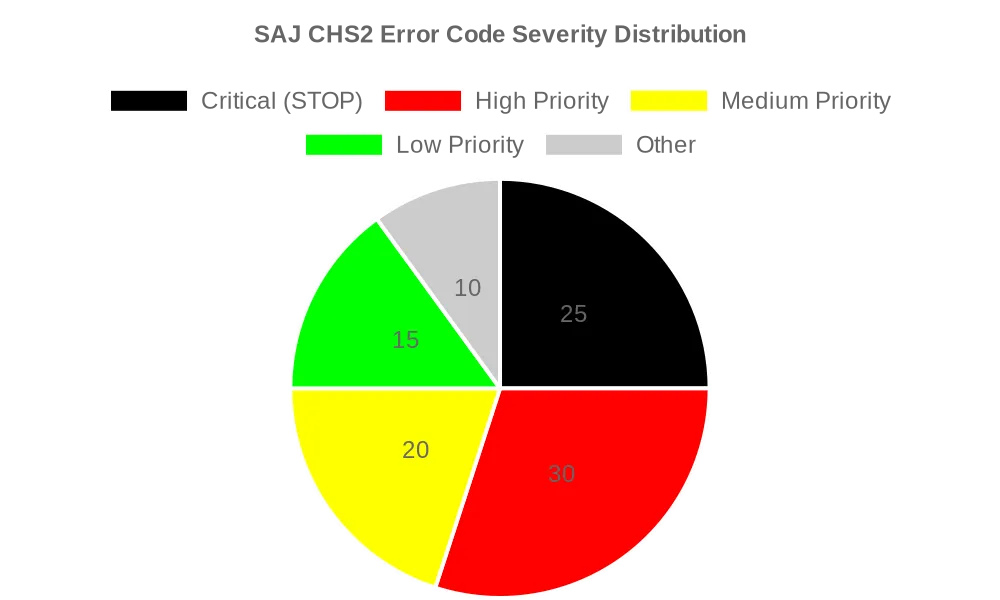
Color-coded severity at a glance: 20 Most Common Error Codes
Here’s your quick reference for the 20 most common SAJ CHS2 error codes (Source: SAJ CHS2 Technical Documentation, 2024):
⚫ Critical Error Codes – STOP Everything
| Error Code | Problem Meaning | Danger Level | First Action |
|---|---|---|---|
| 27 | Ground Fault/GFCI Error | ⚫ STOP | Turn off system immediately, call electrician |
| 31 | Master Relay Error | ⚫ STOP | Turn off system immediately, call electrician |
| 55 | Lost Communication (BMS Critical) | ⚫ STOP | Check connections, call if persists |
| 50 | BMS Device Critical Error | ⚫ STOP | Turn off system immediately, call electrician |
| 54 | DCI Device Error | ⚫ STOP | Turn off system immediately, call electrician |
🔴 High Priority Errors – Immediate Action Required
| Error Code | Problem Meaning | Danger Level | First Action |
|---|---|---|---|
| 09 | AC Voltage Out of Range | 🔴 Élevé | Check with neighbors about power issues |
| 10 | AC Frequency Error | 🔴 Élevé | Verify country settings, check grid |
| 18 | Grid Lost Error | 🔴 Élevé | Check AC connections and breakers |
| 19 | Grid Voltage Fault | 🔴 Élevé | Contact utility company |
| 24 | Over Bus Voltage | 🔴 Élevé | Check DC panel configuration |
| 03 | High Temperature Error | 🔴 Élevé | Check ventilation, wait to cool |
🟡 Medium Priority Errors – Investigate Soon
| Error Code | Problem Meaning | Danger Level | First Action |
|---|---|---|---|
| 01 | Relay Error | 🟡 Moyen | Try system reset procedure |
| 45-48 | Fan Errors | 🟡 Moyen | Check fan operation, replace if needed |
| 81 | Lost Communication (Display) | 🟡 Moyen | Check display cable connections |
| 85 | BMS Address Conflict | 🟡 Moyen | Check parallel battery configuration |
🟢 Low Priority Errors – Monitor and Schedule
| Error Code | Problem Meaning | Danger Level | First Action |
|---|---|---|---|
| 91 | Performance Monitoring Alert | 🟢 Faible | Check system performance data |
| 92 | Maintenance Reminder | 🟢 Faible | Schedule routine maintenance |
| 93 | Firmware Update Available | 🟢 Faible | Plan firmware update |
| 94 | Battery Balancing Needed | 🟢 Faible | Schedule balancing cycle |
Understanding the Color System
The SAJ CHS2 uses a three-tier classification system for error severity:
- ⚫ STOP (Black): Safety hazard – turn off immediately and call professional
- 🔴 High (Red): System protecting itself – investigate cause quickly
- 🟡 Medium (Yellow): Needs attention – try basic troubleshooting
- 🟢 Low (Green): Minor issue – monitor and schedule maintenance
Important Note: Error code numbers may vary slightly between firmware versions. Always refer to your specific system’s display for the exact code definition.
Another Key Message: Most SAJ CHS2 errors are your system’s protective features working correctly. The system is designed to shut down safely rather than risk damage to your equipment or home.
Reading the LEDs and HMI messages
Beyond Error Codes: Visual Communication
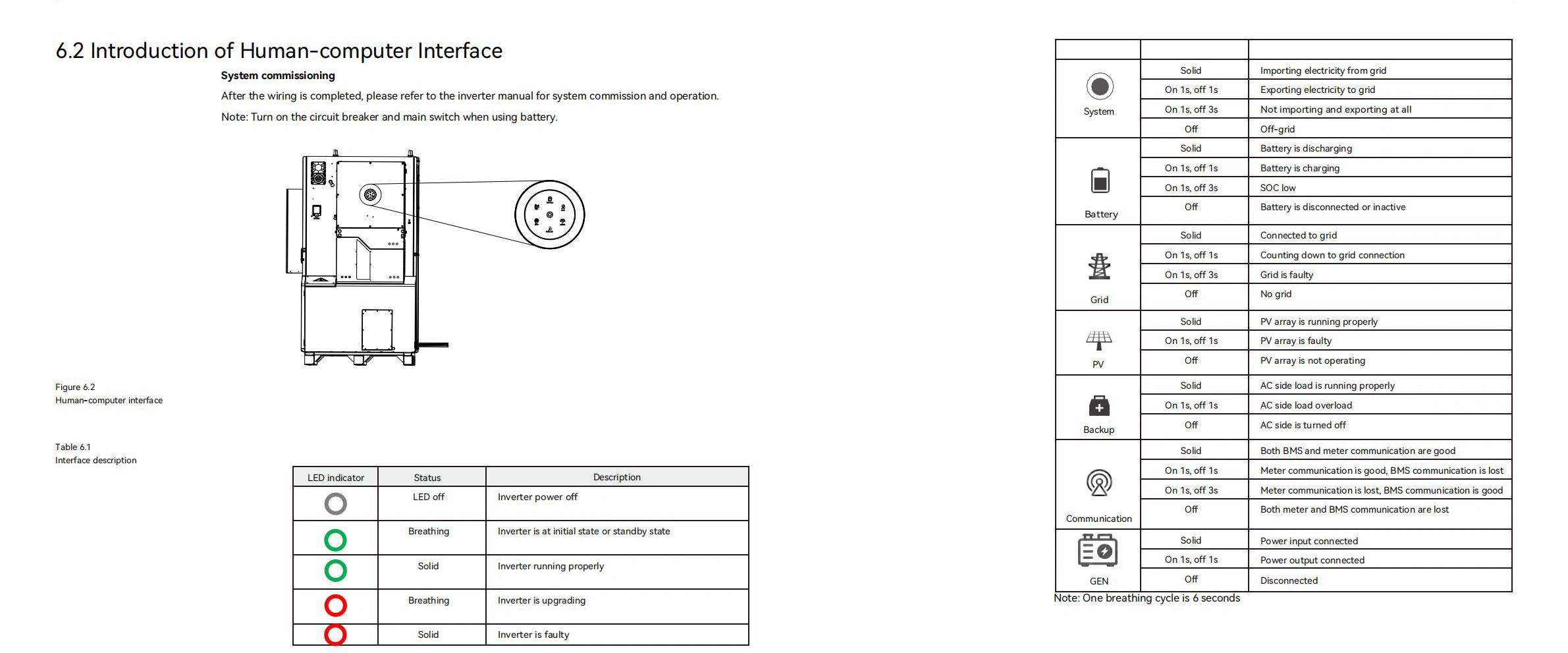
Beyond error codes, your SAJ CHS2 system communicates through LED indicators and display messages. Understanding these visual cues helps you assess your system’s status at a glance.
LED Status Indicator Reference
The official LED patterns are documented as follows:
| LED Color/Pattern | Technical Meaning | What You Should Do |
|---|---|---|
| Green Steady | Normal operation, system running | Nothing – system working properly |
| Green Flashing | Normal operation, varying power | Nothing – normal solar variation |
| Yellow Steady | Warning condition active | Check display for specific warning |
| Yellow Flashing | Warning condition clearing | Monitor – may resolve automatically |
| Red Steady | Error condition, system stopped | Check error code, follow safety protocol |
| Red Flashing | Critical error, protective mode | STOP – Follow emergency shutdown |
| No LED | System powered off or critical failure | Check power connections, breakers |
Display Message Quick Reference
When you see specific display messages, here’s what they typically mean:
Normal Operation Messages
- "System Normal" = All components operating within specifications. Your system is generating or storing power safely.
- "Grid Monitoring" = System checking grid power quality before connecting. This is normal – typically lasts 5-10 minutes after power restoration.
Communication Messages
- "BMS Communication" = System talking to battery management system2. Brief messages are normal during startup.
Warning Messages
- "Protective Mode" = System detected an issue and stopped operation to prevent damage. Check error code for specific cause.
- "Emergency Stop" = Critical safety shutdown activated. Do not restart – call professional immediately.
Visual Connection to Error Severity
The LED color directly relates to your error code color system:
- Green LED = Green level errors (minor/maintenance)
- Yellow LED = Yellow level errors (investigate soon)
- Red LED = Red/Black level errors (immediate action required)
Now that you can read your system’s visual language, let’s determine if your error indicates a dangerous situation…
Is This SAJ CHS2 Error Dangerous? Your 30-Second Safety Check
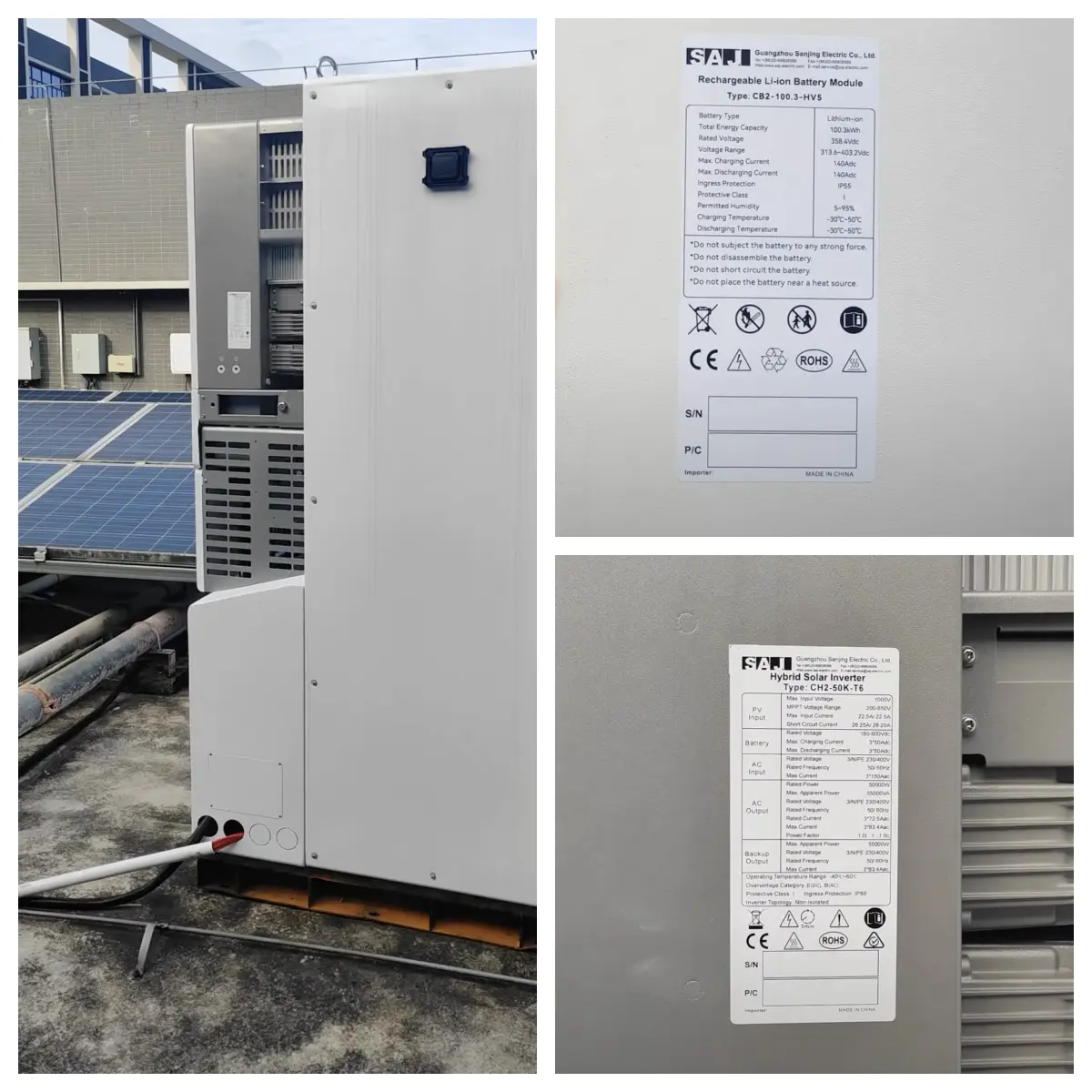
The Most Important Question First
When your SAJ CHS2 displays an error, your first question should always be: "Is this safe?"
Here’s your rapid safety assessment protocol.
⚫ STOP Everything – Call Professional NOW If You See:
Critical Error Codes: 27, 31, 50, 54, 55
These indicate serious electrical safety issues (Source: SAJ Documentation, 2024):
Critical Code Breakdown:
- Code 27 (Ground Fault): Electrical current escaping where it shouldn’t – potential electrocution hazard
- Code 31 (Master Relay): Main safety relay malfunction – system cannot safely connect/disconnect
- Code 50 (BMS Critical): Battery management failure – potential fire or explosion risk
- Code 54 (DCI Device): DC current injection fault – can damage grid equipment
- Code 55 (BMS Lost Communication): Can’t monitor battery safety – immediate shutdown required
Physical Warning Signs:
Look for these danger signals:
- Any burning smell from the system
- Sparks or unusual sounds (crackling, popping)
- Water or moisture around electrical connections
- System feels extremely hot to touch
- Smoke or visible damage
Immediate Action Decision Matrix
| Condition | Niveau de risque | Your Immediate Action |
|---|---|---|
| Critical codes (27,31,50,54,55) OR physical warning signs | ⚫ EMERGENCY | Turn off AC and DC switches immediately, call electrician |
| Grid errors (09,10,18,19) + neighbors having power issues | 🔴 Monitor | Wait for utility restoration, monitor system |
| Grid errors + only your system affected | 🔴 Investigate | Check breakers, call electrician if needed |
| Temperature error (03) + very hot weather | 🟡 Wait | Check ventilation, wait for cooler conditions |
| Temperature error + cool weather | 🔴 Service | Schedule professional inspection |
| Communication errors (81,85) | 🟢 Basic Fix | Check cables, try reset procedure |
| System working but showing warning | 🟡 Schedule | Monitor performance, schedule maintenance |
The Golden Safety Rule: "When in Doubt, Shut Down"
If you have ANY uncertainty about safety:
Emergency Shutdown Sequence:
- Turn off the AC disconnect switch first
- Turn off the DC disconnect switch second
- Wait 5 minutes before any inspection (capacitor discharge safety)
- Call a qualified electrician
Cost vs. Safety Reality: This might cost you a few hours of system operation, but it could prevent thousands in damage or protect your family’s safety.
Emergency Contact Criteria
Call an electrician immediately if:
- Any ⚫ black-level error code appears
- System shows signs of physical damage
- You smell burning or see smoke
- Error codes appear after storms or electrical work
- Multiple different error codes appearing rapidly
- System behavior doesn’t match the error descriptions
Important Safety Note: Professional electrician visits typically cost $200-400. House fires or electrocution injuries cost much, much more. When safety is uncertain, always choose the safe path.
Emergency Protocol: When & How to Safely Shut Down Your System
Some SAJ CHS2 error codes, in addition to any physical warning signs like smoke or unusual noises, require an immediate and complete system shutdown to prevent equipment damage or serious safety hazards.
Immediately initiate the following protocol if you encounter any of these critical conditions. This guide is your definitive, step-by-step procedure for ensuring safety.
Part 1: The Emergency Shutdown Procedure
This is a three-step process. Follow it exactly in the order presented.
-
Isolate All Power Sources
This must be done in a specific sequence to ensure safety:- First, turn OFF the AC disconnect switch (this isolates the system from the grid).
- Second, turn OFF the DC disconnect switch (this isolates the system from the solar panels).
- Finally, do not touch any other system components, wiring, or connections.
-
Observe the Critical 5-Minute Safety Wait
After isolating power, you must wait for a minimum of exactly 5 minutes before any further action or inspection. This step is not optional; it is a critical safety requirement.WARNING: Electrical Hazard
Your SAJ CHS2 system contains large internal capacitors that store a potentially lethal electrical charge, even after the system is turned off. These components require a full 5 minutes to discharge safely. Attempting to touch or work on the system before this period has passed can result in severe electrical shock, equipment damage, and will invalidate your warranty. -
Verify the System is Fully Off
After the 5-minute wait period has passed, visually verify that the system is completely de-energized.- Check that the AC disconnect switch is in the OFF position.
- Check that the DC disconnect switch is in the OFF position.
- Confirm that no LED indicators are active on the system.
- Confirm that the display screen is dark or shows a "System Off" message.
Part 2: The Safe System Restart Procedure
Do not attempt to restart the system until the underlying issue has been resolved.
IMPORTANT: Only restart your system under the following conditions:
- The original issue causing the critical error has been identified and fully resolved.
- A qualified professional has inspected the system and cleared it as safe for operation.
- At least 5 minutes have passed since the initial shutdown.
When it is confirmed safe to proceed, follow this restart sequence:
- First, turn ON le DC disconnect switch (solar panels).
- Wait approximately 30 seconds for the system to initialize.
- Second, turn ON le AC disconnect switch (grid connection).
- Monitor the system’s display and operation for at least 10 minutes to ensure it is stable and no errors reappear.
If any critical errors reappear during or after the restart, immediately repeat the full emergency shutdown procedure and contact professional help. Repeated errors indicate an underlying issue that requires expert diagnosis.
Summary
Understanding your SAJ CHS2 error codes is the key to transforming a potentially stressful situation into a simple, systematic problem-solving process. Most alerts are not signs of failure, but rather your system’s protective features working correctly to keep your equipment and home safe. Error codes are your system talking to you, not yelling at you. This guide helps you understand the conversation.
Your 3-Step Action Plan
When an error code appears, follow this clear, safe, and effective plan.
-
Identify & Assess
- First, look up your specific error code in our quick reference table to understand its meaning and severity level.
- Then, perform the 30-second safety check to determine if the situation requires immediate, professional attention or if it’s safe for you to proceed.
-
Troubleshoot & Resolve
- For non-critical errors, apply the appropriate solution from this guide. Many issues (over 60%) can be resolved with simple steps like a system reset.
-
Escalate When Necessary
- Know your escalation path. If the issue is complex, involves physical hardware, or if you have any doubt about electrical safety, the correct choice is always to contact a qualified professional.
Key Principles for Peace of Mind
Beyond the action plan, keeping these core principles in mind will ensure you manage your system with confidence for years to come.
-
Safety is Non-Negotiable
Your personal safety and the protection of your property are worth more than any repair cost or system downtime. When in doubt, always choose to shut down the system and seek professional consultation. -
Prevention is Powerful
Proactive, simple maintenance can prevent the vast majority of avoidable system problems. A few minutes of attention each month can save thousands in potential repair costs and significantly extend the life of your equipment. -
You Have a Support Network
You are not alone with your SAJ system. A network of qualified professionals exists to help with electrical, technical, and parts support whenever you need it.
Bookmark this guide. Error codes tend to appear at the most inconvenient times. Having this systematic approach readily available will reduce stress and guide you to the correct and safest course of action, every time.